
Private Integrations
Tailored for individual practices or organizations wanting to create custom integrations for their own use. This option enables seamless connectivity between ezyVet and internal systems, optimizing workflows specific to your practice’s needs.
How to apply
ezyVet customers can fill out the application form on our website!
INFO
Vendors that are not ezyVet customers should apply to become a commercial partner.
What happens next?
Our Partnerships team will assess your application and should your idea fit IDEXX's integration guidelines we'll reach out with an agreement to complete.
Due to a high volume of private integration requests it could take several weeks to hear back from our team.
Guidelines
- The request comes from an ezyVet customer for API access to their own data.
- The integration is to be used by the customer requesting it.
- The API access will not be abused (i.e send the credentials to a third party company)
- The integration will not incorporate SMS functionality unless run through the ezyVet framework
- The integration will not incorporate payment functionality unless run through the ezyVet framework
What if I have more than one database/hospital?
The same API partner record can be used across databases/hospitals so long as they are owned by the same ezyVet customer/group. An integration will need to be set up on each site.
What if I have more than one use-case?
A customer can have as many private integrations as they’d like. A new private integration agreement will be needed per integration/use-case (i.e. data reporting, booking system) and will incur the setup fee per integration.
Fees
What is the one-time setup fee for a private read-only integration?
The implementation fee for a private read-only integration is $500 USD. For practices located outside the United States, this fee will be converted to your local currency.
Are there any additional ongoing fees associated with read-only access across multiple hospital sites?
No. Read-only integrations incur only the one-time $500 USD implementation fee — there are no recurring charges regardless of how many sites the integration is deployed across.
Is there a fee structure for practices that anticipate adding integrations or locations over time?
For read-only integrations, the one-time implementation fee applies per integration and there are no additional fees as your organization grows.
If you require write-back access into ezyVet, a recurring fee of $50 USD per location per month applies. For practices outside the United States, this fee will be converted to your local currency. As your organization adds divisions or hospital sites, this fee will automatically adjust to reflect the updated number of locations — full details are outlined in your integration agreement.
How do I configure my private integration?
Once your integration has been created, it will be made available to site admins to configure in all of your organization’s ezyVet sites. You no longer need to contact ezyVet support to have this completed.
Log into your ezyVet site
Navigate to the Admin tab

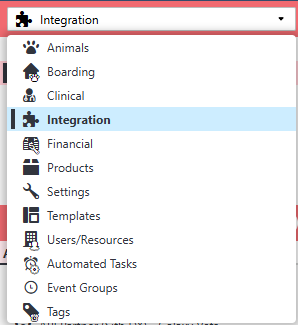
Click Integration on the left-hand drop down menu
Search for API Partner
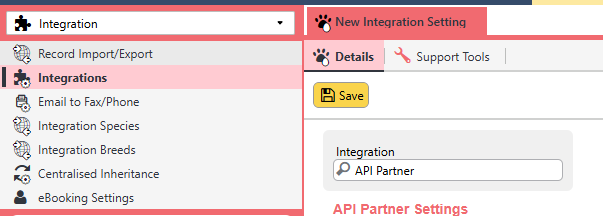
In the dropdown, select your private integration (it will appear at the top of the list) and Save

Enable all of the scopes and Save

Download the credentials for API access to your ezyVet site

If you have any trouble or can’t find your private integration, reach out to apisupport-ezyvet@idexx.com.